Photoshop
 Maya
Maya ZBrush
 Houdini
 Substance Painter
 Blender
 Unreal Engine
 Arnold
 Nuke
Nuke KeyShot
 V-Ray
V-Ray Marmoset Toolbag
 Mari
Mari Marvelous Designer
 Substance Designer
 3ds Max
 3DCoat
 Redshift
 Faceform Wrap
 Lightroom
 After Effects
 OctaneRender
 SpeedTree
 Daz 3D
 Agisoft Metashape
 Fusion
 Modo
Modo RealityCapture
 Gaea
Gaea Cinema 4D
 Gravity Sketch
 Premiere
 Procreate
 Clip Studio Paint
 SketchUp
 SketchBook
 Katana
 Natron
 Mudbox
 Quixel Bridge
 Quixel Megascans
 Quixel Mixer
 Substance 3D Modeler
 World Creator
 Yeti
Yeti Ziva VFX
 Mixamo
 Adobe Medium
 Quixel DDO
 xNormal
 Meshmixer
 Storyboard Pro
 DaVinci Resolve
 TreeIt
 World Machine
 Gaffer
 Corel Painter
 SynthEyes
 Krita
Krita Massive
 Materialize
 Unity
Unity Ornatrix
 PreForm
 Moi 3D
 animBot
 QuickTime
 ReCap
ReCap


















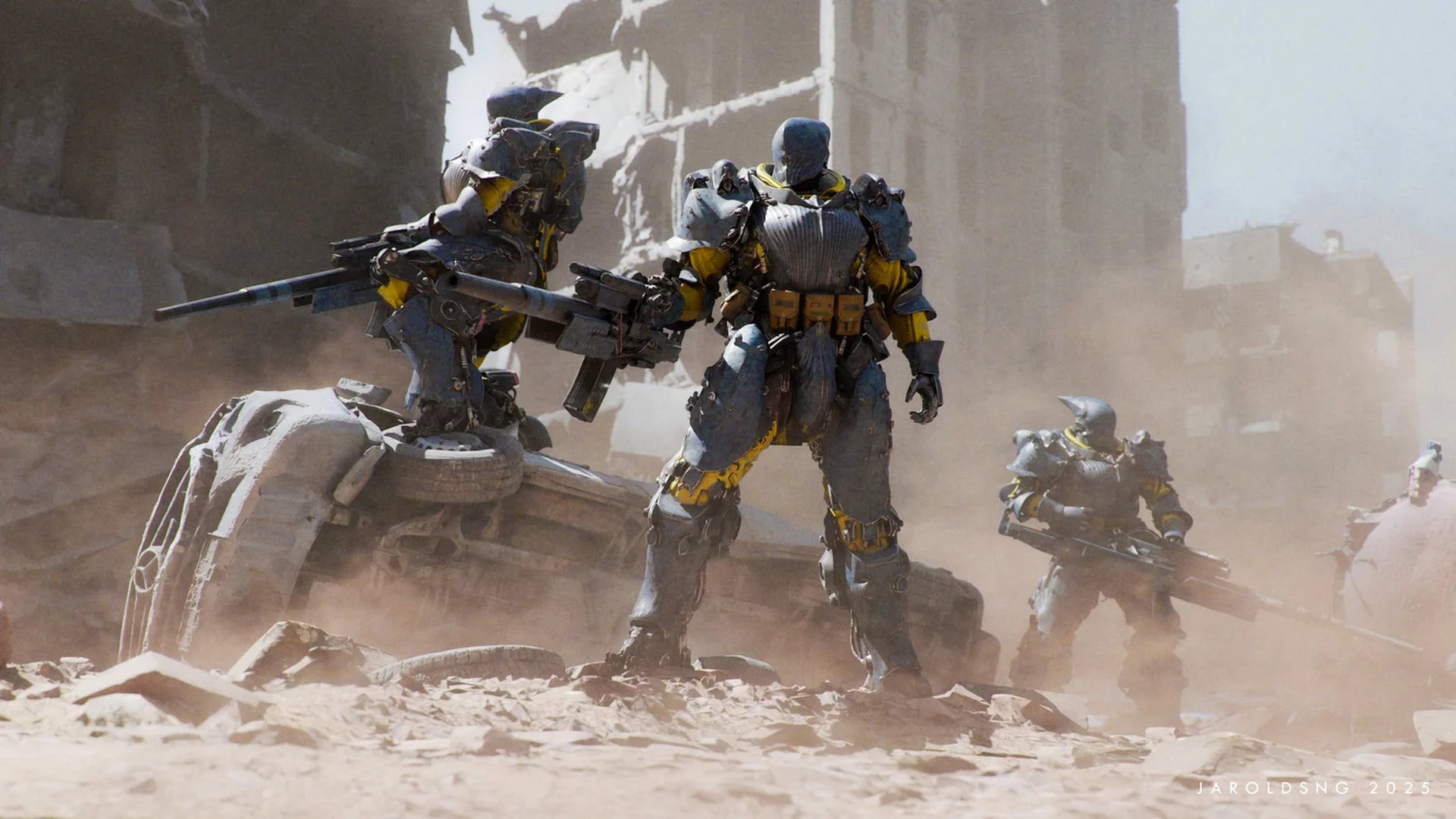
Explore the creation of compelling cinematic concept artwork, from start to finish, in this comprehensive workshop by seasoned professional Jarold Sng. Whether you're a beginner or an experienced concept artist, you'll delve into every aspect of the creative process, from the initial planning to the final execution.
Jarold begins by exploring sketching techniques and photo-bashing in Photoshop, sharing how to quickly generate compelling concepts. The workflow then transitions into Blender, where you'll learn sculpting, modeling, material creation, and lighting setup to bring your ideas to life in 3D.
Throughout this 6.5-hour workshop, Jarold shares his practical tips and expert insights garnered from many years of industry experience, emphasizing not just the technical aspects but also the artistry behind the process. From refining your artistic pipeline to honing your thought process, this workshop is tailored to elevate your skills and understanding, regardless of your current proficiency level.
Included with the workshop are all the final PSD files and Blender project files to help with everything you need to study and dissect the techniques demonstrated. While beginners are welcome, familiarity with Photoshop and Blender will enhance your experience and allow you to fully grasp the concepts presented.
10 Lessons
This workshop provides aspiring concept artists with training in professional-level techniques from an industry veteran with extensive AAA gaming and film experience. Jarold Sng provides insight into how he creates cinematic concept art for the entertainment industry, instructing viewers in character and mechanical design, and demonstrating industry-standard tools.
Duration: 1m 47s

This lesson teaches that successful concept art requires extensive pre-production work before any drawing begins. The most critical lesson is that every design decision must tie back to the emotional ‘why’ for each character. By combining linear references with non-linear references and establishing clear visual targets and deliverables, artists can create designs that are both technically sound and emotionally resonant.
Duration: 27m 31s

This lesson emphasizes that professional concept art is about disciplined process management. By separating creative exploration from critical evaluation, working within clear parameters, and committing to completing selected concepts, artists can produce viable designs within production deadlines. Jarold advocates for seeking the best possible solution right now, rather than unattainable perfection, establishing deliverable work while remaining open to refinement when time permits.
Duration: 48m 49s

This lesson emphasizes that balancing artistic vision with practical constraints like time management and client needs is crucial for producing professional concept art. Working outside one's comfort zone is inevitable in production environments, making it essential to develop reliable processes based on fundamental design principles rather than relying solely on personal preferences. By maintaining discipline, respecting time, viewing designs through a narrative lens, and making use of shape language, artists can consistently deliver quality work across any genre.
Duration: 35m 49s

This lesson demonstrates a hybrid workflow that prioritizes efficiency and artistic vision over technical perfection. By treating Blender as an advanced sketching tool, artists can leverage lighting, perspective, and form without getting bogged down by topology, rigging, or simulation. A three-stage approach ensures consistent progress from rough volumes to detailed presentation, while kitbashing enables artists to quickly add visual complexity to a concept while maintaining their unique design voice.
Duration: 49m 59s

This lesson demonstrates that effective 3D concept modeling is about maintaining a workflow that focuses on artistic vision. By breaking the process into manageable stages, artists can translate their 2D designs into 3D space while improving upon the original concept. By spending time on refining proportions, and treating 3D as an interpretive medium, artists can add significant value to a design.
Duration: 50m 35s

This lesson demonstrates how combining traditional 2D pattern design with modern 3D tools like Shrinkwrap modifiers creates a flexible approach to surface detailing. Throughout the process, the key is to make decisions quickly, and to progressively refine the concept through continuous evaluation.
Duration: 34m 57s

This lesson demonstrates that by doing the heavy lifting in Blender, then enhancing the results with Photoshop, artists can produce production-ready concept sheets that are both visually appealing and technically accurate. Maintaining the balance between photorealistic 3D renders and artistic enhancement is key to improving clarity without losing the base model. This approach saves time while delivering professional results that translate to final production assets.
Duration: 57m 34s

This lesson demonstrates an efficient workiflow that leverages photobashing, texture generation, and displacement mapping to create a detailed environmental backdrop. By treating Blender as a flexible sketching tool, artists can explore design possibilities quickly while maintaining visual quality for concept art presentation. This method is valuable when the environment serves as a backdrop for character-focused compositions, allowing artists to achieve impressive results quickly.
Duration: 49m 39s

The final lesson in the workshop emphasizes Jarold’s philosophy of creating ‘good enough’ keyframes quickly to encourage design discussions and feedback, rather than spending time on polished illustrations. By combining 3D rendering workflows with Photoshop, concept artists can produce compelling visual presentations that showcase their designs while remaining flexible enough to accommodate changes.
Duration: 34m 44s

Primary tools
For this workshop you’ll need:
Project Files
The following project files are available for this workshop, providing access to Jarold Sng's materials to support the learning process. Inside, you'll find:
- Photoshop design files (.psd) – Complete concept art files including character designs, shot compositions, and thumbnail sketches that artists can study layer-by-layer
- 3D blockout file (.blend) - A Blender blockout file showing the 3D layout and spatial relationships
- Turntable video (.mp4) - A rotating view of the final character designs to see them from all angles
Skills Covered
Who’s this Workshop for?
This workshop is designed for concept artists, digital artists, and entertainment industry professionals seeking to master cinematic artwork creation. Beginners and experienced artists will benefit from Jarold Sng's approach to the creative pipeline from concept to final execution.
Aspiring concept artists, game developers, pre-production artists, and digital illustrators will gain invaluable insights into professional workflows. The workshop bridges traditional digital painting with 3D techniques, making it essential for artists wanting to expand their skillset and industry relevance.
Learning Outcomes
By completing this workshop, artists will have a complete understanding of the cinematic concept art pipeline, combining Photoshop sketching techniques with advanced 3D workflows.
Key skills include:
- How to develop compelling concepts using professional sketching and ideation techniques in Photoshop.
- How to execute effective photo-bashing workflows to quickly generate realistic and atmospheric concept artwork.
- How to seamlessly transition 2D concepts into 3D using Blender's sculpting and modeling tools.
- How to create convincing materials and textures that enhance the cinematic quality of concept artwork.
- How to design dramatic lighting setups that support storytelling and atmospheric depth in scenes.
- How to integrate traditional concept art principles with modern 3D production techniques.
- How to optimize artistic workflows for efficiency while maintaining high-quality creative output throughout projects.