Maya
Maya ZBrush
 Houdini
 Substance Painter
 Unreal Engine
 Arnold
 Nuke
Nuke KeyShot
 V-Ray
V-Ray Marmoset Toolbag
 Mari
Mari Marvelous Designer
 Substance Designer
 3ds Max
 3DCoat
 Redshift
 Faceform Wrap
 Lightroom
 OctaneRender
 SpeedTree
 Daz 3D
 Agisoft Metashape
 Fusion
 Modo
Modo RealityCapture
 Gaea
Gaea Cinema 4D
 Gravity Sketch
 Premiere
 Procreate
 Clip Studio Paint
 SketchUp
 SketchBook
 Katana
 Natron
 Mudbox
 Quixel Bridge
 Quixel Megascans
 Quixel Mixer
 Substance 3D Modeler
 World Creator
 Yeti
Yeti Ziva VFX
 Mixamo
 Adobe Medium
 Quixel DDO
 xNormal
 Meshmixer
 Storyboard Pro
 DaVinci Resolve
 TreeIt
 World Machine
 Gaffer
 Corel Painter
 SynthEyes
 Krita
Krita Massive
 Materialize
 Unity
Unity Ornatrix
 PreForm
 Moi 3D
 animBot
 QuickTime
 ReCap
ReCap


















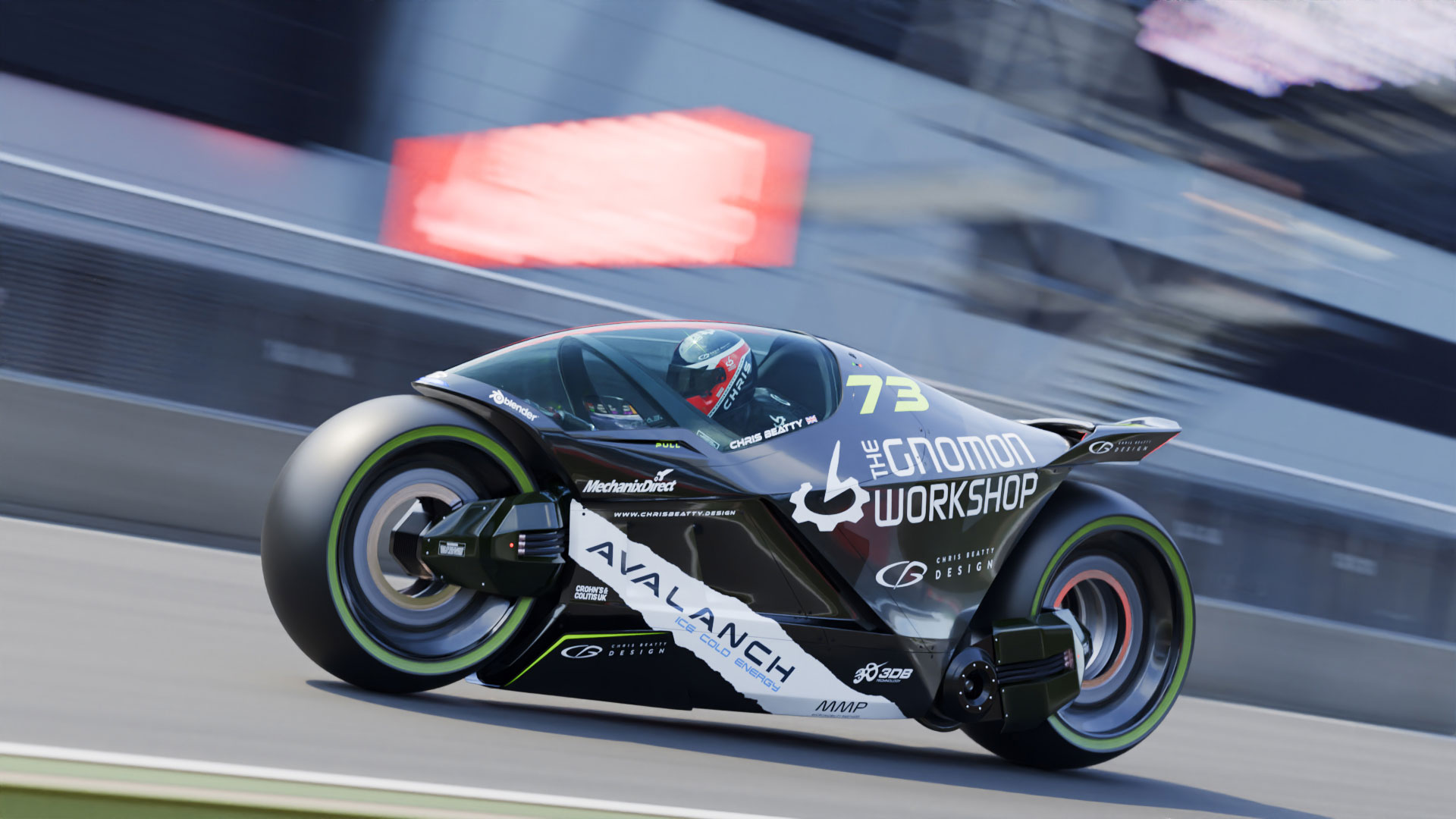
Design a near-future racing machine in this conceptual vehicle design workshop by veteran 3D artist and concept designer, Chris Beatty. Over the course of 8 hours, Chris guides artists through his entire design process, which he has honed over two decades of experience working in the industry designing high-profile concepts for motorsports such as for the world-famous Indy 500.
Chris shares his extensive knowledge, skills, and techniques with artists of all levels who are looking to master a practical “form follows function” creative process. Grounded in real-world engineering considerations, you'll learn how to style a race vehicle with a touch of science-fiction for added artistic license.
This workshop uses Blender as the primary production tool. Chris demonstrates his Blender modeling techniques to sculpt the vehicle's form, showing how to maintain maximum creative freedom throughout the process. He also details how to extend the commitment point as far as possible before reaching the final modeling and rendering stage. The creative process is also complemented by Adobe Creative Cloud’s Photoshop, Illustrator, and After Effects.
By completing this workshop, you will develop a comprehensive understanding of how to create vehicle concepts that balance function and artistic flair, leading to greater believability in the final results. These principles can be applied to any vehicle genre, whether a real-world race car or your next spaceship project. You should emerge from this workshop feeling accomplished and knowledgeable in the art of vehicle design.
The Scene Asset Animated Environment, Bike In Studio, and Bike Studio Turntable are provided as learning resources with this workshop. All HDR images are sourced from HDRI Haven; the rigged body model was sourced from CGTrader, and the motorcycle shock absorber model also came from CGTrader.
13 Lessons
Chris Beatty introduces his workshop, which establishes a professional framework for vehicle concept development that balances creative exploration with practical organization. He demonstrates that successful design work begins long before opening 3D software; it requires systematic file management, thorough research across multiple sources, and careful consideration of both aesthetic and technical elements. By grounding the futuristic motorcycle concept in real emerging technologies, such as gyroscopic balancing, while drawing inspiration from diverse design sources, his project aims to create something that feels both imaginative and plausible. This approach can be applied to any concept design project, making it valuable for aspiring designers building their portfolios.
Duration: 29m 21s

This sketching phase demonstrates that effective concept design doesn't require perfect drawing skills but rather a willingness to explore ideas rapidly and iteratively. Chris successfully moves from a blank canvas to viable design directions by maintaining a fast, experimental approach — and by not getting bogged down in details too prematurely. The sketches establish key design language elements, including an aggressive stance, flowing lines that suggest speed, and distinctive suspension treatments, to inform the more precise 3D modeling phase, where proportions, rider ergonomics, and final forms can be evaluated and refined.
Duration: 24m 25s

This lesson emphasizes that successful 3D concept development requires patience and iteration rather than immediate perfection. Chris's transparent sharing of his own early, crude models from the Velocity Project reinforces that professional designers work through multiple rough versions before achieving refined results. The key is to learn how to establish proper proportions, rider packaging, and overall form relationships early using flexible techniques, such as image planes and proportional editing, knowing that details and refinement will come in later stages of the design process.
Duration: 41m 35s

This lesson exemplifies the exploratory nature of concept design in 3D, where form development happens through continuous experimentation and refinement rather than following a rigid plan. Chris demonstrates that successful concept modeling requires patience to iterate through multiple variations while maintaining both visual appeal and basic mechanical plausibility. The next phase will focus on detailing the internal mechanical systems (chassis frame, gyros, batteries, motors, and suspension) to ensure the design is grounded in feasible engineering principles while maintaining its futuristic aesthetic.
Duration: 44m 8s

This lesson provides an unfiltered look at the vehicle design process, showcasing how concepts evolve through constant iteration and problem-solving. Chris emphasizes that creating convincing concept vehicles requires understanding internal mechanics well enough to make them believable, even without engineering precision. The key is in knowing that design rarely happens perfectly on the first attempt. He demonstrates that success comes from the willingness to experiment, abandon ideas that don't work, and continuously refine until form and function harmonize into a compelling, realistic concept.
Duration: 30m 46s

This lesson demonstrates the reality of concept design work: it's an iterative, sometimes messy process requiring constant problem-solving and revision. Chris’s willingness to step back, identify fundamental errors (such as the suspension mounting), and completely rework sections underscores the importance of taking breaks and reviewing work with fresh eyes. While the underlying frame geometry became somewhat organic and imperfect through multiple revisions, the focus remained on creating a visually compelling concept that balances futuristic styling with believable mechanical functionality. This is a "form follows function" approach that makes the design feel grounded in reality despite its advanced nature.
Duration: 32m 49s

This lesson demonstrates the messy, non-linear reality of vehicle design work, where concepts must be constantly evaluated, refined, and sometimes completely rebuilt. Chris’s willingness to scrap and redo the frame after stepping away from the project illustrates the importance of critical self-assessment and maintaining quality standards. The result is a motorcycle design that's evolving from rough placeholder geometry into a cohesive, styled concept with clear character lines and improved proportions, though significant detailing work remains.
Duration: 52m 43s

This lesson represents the critical refinement phase of the motorcycle concept, where Chris transitions from rough blocking to near-final forms. He demonstrates a realistic design process, including mistakes, rework, and the value of stepping back for perspective. By the end, the fundamental design is locked down with proper proportions, mechanical systems, and styling lines established, setting the stage for the next lesson’s focus on final detailing, panel gaps, fasteners, cables, and preparation for rendering and presentation.
Duration: 40m 12s

This lesson demonstrates that professional concept design requires significant time investment in the refinement phase. This includes the often tedious but essential work of cleaning up geometry, fixing surface issues, and adding realistic details. While polygon modeling offers flexibility for visualization, achieving production-quality surfaces demands persistent attention to edge flow, vertex placement, and surface continuity. Chris’s honest portrayal of the challenging, sometimes frustrating nature of this work, including moments of procrastination and distraction, provides valuable insight into the reality of 3D design workflows beyond the initial creative concepts.
Duration: 37m 33s

This lesson emphasizes that creating professional-quality hard-surface models requires patience and discipline in managing geometry, even when the work becomes tedious. Chris demonstrates that achieving photorealistic results with proper reflections and surface continuity requires meticulous attention to topology, a willingness to iterate on designs multiple times, and a strategic use of techniques such as normal transfer to maintain quality. While Boolean operations provide quick initial results, the real craftsmanship lies in the hours spent cleaning up geometry, properly managing edge loops, and ensuring every vertex contributes to smooth, believable surfaces that will render convincingly under various lighting conditions.
Duration: 45m 41s

This lesson demonstrates that the final detailing phase of vehicle modeling requires extensive patience and problem-solving, particularly when managing complex geometry and surface normals. Chris emphasizes that, while fine-tuning can feel endless, thoughtful placement of mechanical details transforms a clean model into a believable racing machine. The bike is now ready for the final stages: complete material shading, paint scheme application, and studio lighting setup for final rendering.
Duration: 52m 50s

This comprehensive lesson demonstrates professional workflows for taking a 3D vehicle concept from modeling through final presentation-ready renders. Chris emphasizes practical problem-solving techniques like using camera projections for UV mapping, creating dual-surface materials, and employing physical geometry for motion blur effects. The project showcases how to combine technical modeling skills with artistic presentation techniques to create portfolio-worthy work suitable for social media promotion and professional demonstration. The emphasis throughout is on creating believable, photorealistic results while maintaining flexibility for future modifications and variations.
Duration: 1h 2m 20s

This final lesson emphasizes that professional design is an iterative, never-ending learning process in which even experienced designers continually critique and refine their work. Chris’s 20-plus years of experience shine through in his balanced approach of creative vision grounded in engineering practicality, and his honest self-assessment demonstrates the professional mindset of continuous improvement. He argues that design excellence comes not from achieving perfection but from embracing a journey of perpetual growth, learning from each project, and maintaining the discipline to draw a line when deadlines demand it while already envisioning the next iteration.
Duration: 8m 25s

Primary tools
For this workshop you’ll need:


* Note that these programs and materials will not be supplied with the course.
Project Files
When you download the workshop files, you'll get access to a complete Blender project package featuring professional 3D environments and animated assets. Inside, you'll find:
- Blender scene files – Ready-to-open project files including an animated environment scene and a detailed bike studio setup
- Turntable animation - A professional studio setup showcasing 360-degree product visualization techniques
Skills Covered
Who’s this Workshop for?
This workshop is designed for concept artists, vehicle designers, and 3D artists of all skill levels who want to master professional vehicle design techniques. Whether you're working in automotive design, gaming, film, or motorsports, this comprehensive course will elevate your conceptual design abilities.
Freelancers, studio artists, and hobbyists will also benefit significantly from learning Chris Beatty's proven "form follows function" methodology. You'll gain industry-standard techniques that bridge engineering reality with creative vision, making your vehicle concepts more believable and professionally competitive across any genre.
Learning Outcomes
By completing this workshop, artists will master a comprehensive vehicle design process that balances real-world engineering with creative science-fiction styling for maximum believability.
Key skills include:
- How to apply "form follows function" principles to create believable vehicle concepts.
- How to use Blender's modeling techniques to sculpt dynamic racing vehicle forms.
- How to maintain creative freedom throughout the entire design and development process.
- How to extend commitment points before finalizing the modeling and rendering stages effectively.
- How to integrate Adobe Creative Cloud tools for comprehensive concept development workflows.
- How to balance engineering considerations with artistic flair for enhanced concept believability.
- How to apply vehicle design principles across multiple genres from racecars to spaceships.